A DaisyDisk alternative that tells you what the folder is
DaisyDisk draws the best disk map on macOS. What it deliberately does not do is explain the folder it just found — or run on Windows. Where the two tools differ, and which question each one actually answers.
DaisyDisk is a good program. It has been the answer to "what is filling my Mac" for well over a decade, its radial map is genuinely the clearest way anyone has drawn a file system, and it is a one-time purchase rather than a subscription. If you already own it, this article is not trying to talk you out of it.
It is about the sentence that comes after the map.
What a disk map does — and where it stops
You run DaisyDisk. It scans. The wheel appears, and one enormous segment sits there wanting to be clicked. You drill in, and in, and in, and eventually you arrive at:
~/Library/Containers/com.docker.docker/Data/vms/0/data/Docker.raw — 62 GBNow what?
The map has done its job perfectly. It found the 62 GB. What it cannot tell you — because it is a map, and maps measure — is:
- that this is the virtual disk of a Linux VM, not a cache
- that deleting it destroys every image, container and named volume you have
- that emptying it from inside Docker frees space that macOS will not see until the next restart
- which of Docker's four separate accounts the 62 GB actually sits in
- and which single command empties that one account without touching the others
Those are five different pieces of knowledge, and none of them is a file size.
The two questions, side by side
| DaisyDisk | BalaneDisk | |
|---|---|---|
| Which folder anywhere is biggest | its speciality — full radial map | known locations only |
| What that folder is | you look it up | one line of plain language |
| Whether it is safe to touch | your call, unaided | a verdict: safe / look first / leave alone |
| How to get the space back | drag to the collector | the owning tool's own command, or the folder |
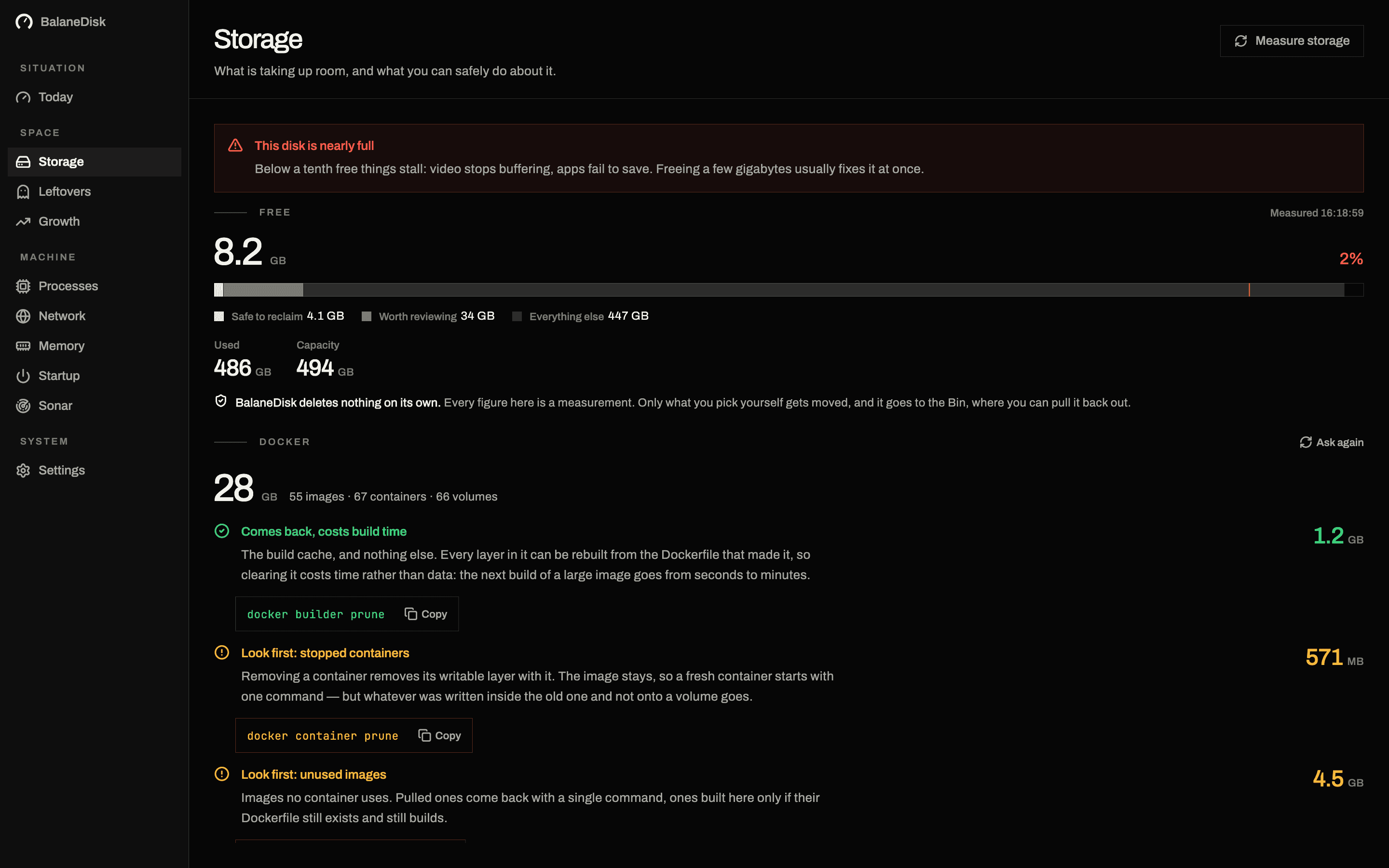
| Docker, split by account | one big file | four accounts, three verdicts, a command each |
| Processes, network, memory | — | included |
| Windows | — | yes, from the Microsoft Store |
| Price | one-time purchase | free for everything it finds |
Read that table honestly and the split is clear. DaisyDisk is better at finding an arbitrary large folder anywhere on the volume. If your 60 GB is sitting in a project directory you forgot about in 2021, a free-form tree scan finds it and BalaneDisk will not, because BalaneDisk measures the locations that are known to fill up rather than drawing the whole disk.
BalaneDisk is better once the folder has a name. Twelve known places on macOS, six on Windows, each with what it is, whether it is rebuildable, and the exact route back.
The verdict is the product
Every finding in BalaneDisk carries one of three verdicts, and they mean specific things:
Safe to remove. Purely rebuildable. A build cache, a downloaded installer, the Trash. Deleting costs you a re-download or a rebuild and nothing else.
Look first. The category that a cleaner would empty and should not. Downloads, Store app data, Docker's data folder as a whole — places where something regenerable and something irreplaceable sit in the same directory.
Leave alone. System data, snapshots, anything where the size is the operating system doing its job.
That is the sentence a map cannot print, and it is the entire reason the app exists. Then it stops: BalaneDisk shows the size, explains the thing, hands you either the command or the folder, and never deletes anything itself.
Docker, as the worked example
Docker is the case where the difference is most visible, because "62 GB in one file" is an accurate measurement and a useless one.
BalaneDisk asks Docker itself and splits the number into four accounts: images, build cache, containers and volumes. Three of them are rebuildable and one is not — a named volume is a database, and it is the one thing docker system prune -a leaves alone while taking every image you built locally and never pushed anywhere.
Each account gets its own command. The build cache gets docker builder prune. The images get theirs. The volumes get a warning instead.
That is the sentence after the map. → Docker is eating your Mac's disk: what prune really deletes
It also covers the other five questions
Disk space is one of six things that go wrong on a computer. BalaneDisk carries the rest in the same app: every running process explained in plain language with its signature checked, every outgoing connection resolved to a company and a country without a single request leaving the machine, memory pressure over hours rather than in the moment, leftovers from applications you removed, and what starts with the machine.
And it runs on Windows, from the Microsoft Store — where the storage question is arguably worse, because the biggest items (WinSxS, hiberfil.sys, WSL virtual disks) are exactly the ones a free-form tree scan measures wrongly or not at all.
Which one to use
Use a disk map when you have no idea where the space went and it could be anywhere. That is what it is for, and BalaneDisk is not a replacement for it.
Use BalaneDisk when you want to know what the big thing is, whether it is safe, and what the correct way to shrink it is — or when the machine is a Windows machine, or when the question was never really about disk space at all.
Plenty of people have both. They answer different questions.
Next: Mac storage full: where the gigabytes actually hide · What your Mac is really doing: the complete guide
Questions people ask
- Is BalaneDisk a DaisyDisk alternative?
- For the question "what is this folder and can I do anything about it", yes — and it runs on Windows as well. For the question "which folder anywhere on this disk is biggest", DaisyDisk's radial map is still the better instrument, and we would rather name that than pretend otherwise.
- What is the best free disk space analyzer for Mac?
- For a full free-form tree scan, GrandPerspective and Disk Inventory X are the long-standing free options, and macOS itself has Storage Management built in. BalaneDisk is free for everything it finds too, but it answers a different question: it measures the known locations that actually fill up and explains each one, rather than drawing every folder on the volume.
- Why does a disk map not tell you what is safe to delete?
- Because size and safety are unrelated. A map shows you that a 40 GB folder exists; it cannot show you that it holds named Docker volumes rather than rebuildable cache. That judgement needs knowledge of the owning tool, which is a different kind of work from measuring bytes.