A CleanMyMac alternative that doesn't clean anything
Most alternatives to CleanMyMac are other cleaners. This is the other direction: a tool that measures the same machine, explains every finding, and leaves the deleting to you — on macOS and Windows, with everything it finds free.
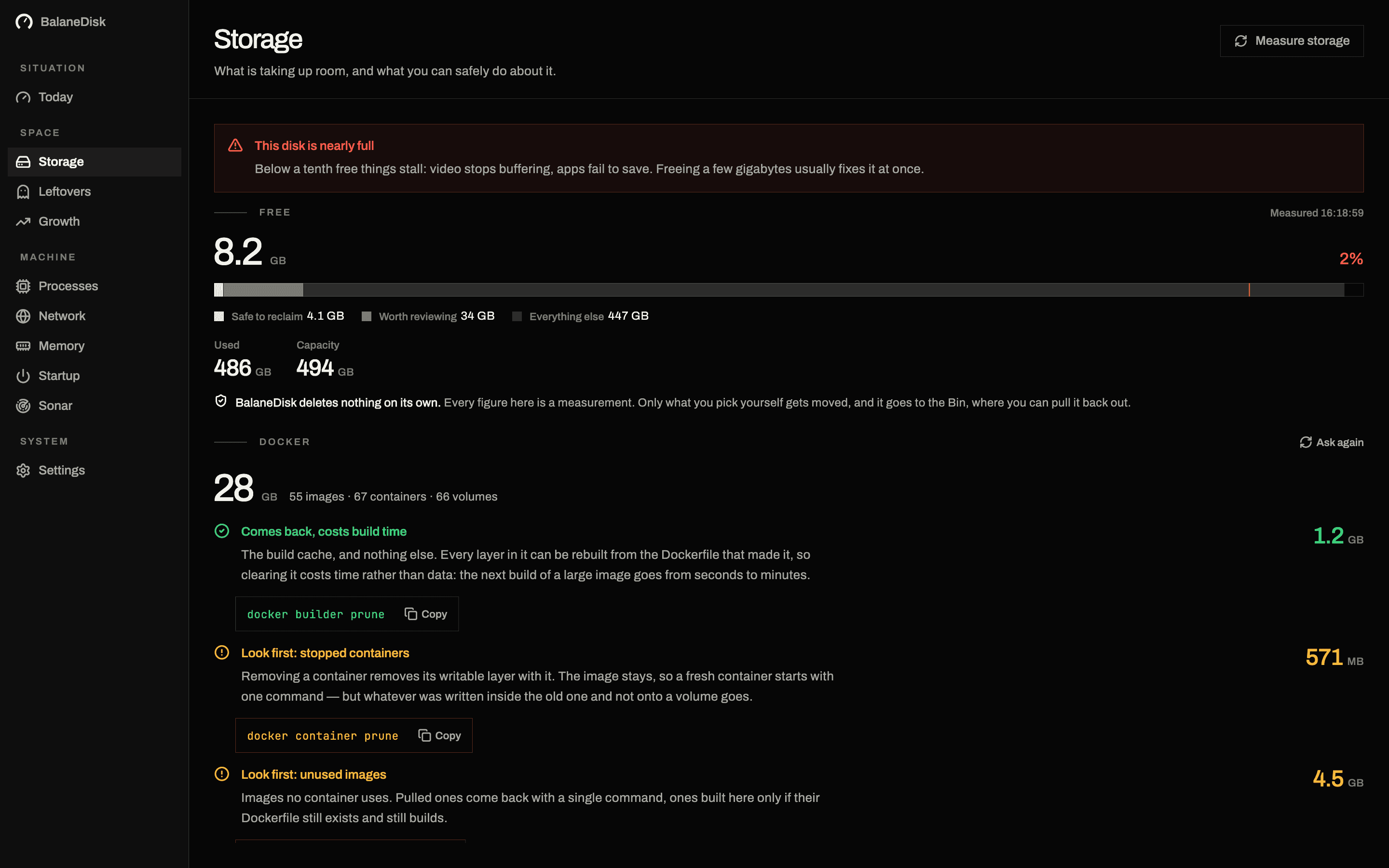
Search for a CleanMyMac alternative and you get a list of other cleaners: a different logo, the same one-click button, the same promise to free up gigabytes you have not looked at.
BalaneDisk is not on that list, and this article is the honest version of why.
What CleanMyMac does that BalaneDisk does not
Let us do this part first, because a comparison that only lists the other side's weaknesses is an advertisement.
CleanMyMac is a maintenance suite. It removes files, it uninstalls applications and their traces, it scans for known malware, it runs maintenance scripts, and it does it all from one button. It is a legitimate, notarised product, its developers know macOS well, and for a great many people that one button is exactly what they want.
BalaneDisk does none of that. It has no clean-up button. It does not uninstall applications. It has no malware scanner. It never deletes a file on its own — the single most destructive-looking action in the whole app moves an application's leftovers to the Bin, and only when you press it.
If you want a program that decides for you and acts, stop reading. That is a real preference and this is the wrong tool for it.
What BalaneDisk does instead
It measures, and it explains what it measured.
| Cleaner | BalaneDisk | |
|---|---|---|
| Storage | frees it | measures it, names the route back |
| Processes | ends them | explains each one, checks its signature |
| Network | — | connections per process, resolved to company and country |
| Memory | "frees" it | pressure over hours, with the history behind it |
| Leftovers | deletes them | shows them with a confidence score |
| Startup | disables entries | shows what each one is holding now |
| Deleting | its purpose | never, by design |
The difference is not caution for its own sake. It is that the judgement is the hard part and the deletion is the easy one.
A folder that looks like a cache from the outside may hold a named Docker volume, which is a database. A leftover folder called com.example.helper may belong to something you deleted in 2023 — or to something you still use under a name you would not recognise. From outside the owning program, those cases look identical. A tool that empties them anyway is not being efficient; it is guessing, and asking you to carry the consequence.
So BalaneDisk hands you what the guess would have been based on: the size, what the thing is in plain language, a confidence score where a match is involved, and then the route. For Docker, the command Docker itself wants (docker builder prune, and it shows you the four accounts separately so you know which one you are emptying). For a folder, the folder, opened in Finder or Explorer. For leftovers, a move to the Bin, on your press.
Free means free here
This is the part people check first, so it goes in plain language.
Everything BalaneDisk finds is free. Every screen — storage, processes, network, memory, leftovers, startup, sonar, the opening briefing. Every verdict on every running process. The full storage scan. No account, no sign-in, no email address. Not a trial.
The subscription buys exactly one thing: the record of the past. The free version keeps 2 hours of history; Pro opens 30 days, including what this computer already measured before you paid. That is the honest division — two questions cost money to answer, when did this start and what changed that day, and both are read out of the record.
No finding is ever behind a paywall. If BalaneDisk sees that a folder grew by 40 GB last night, the free version tells you.
It runs on Windows too
CleanMyMac is a Mac product. If you have both a Mac and a PC — a laptop at home and a desktop at work, or a machine you dual-boot — the same tool covers both here.
On Windows, BalaneDisk reads processes through Win32_Process and checks every executable against its Authenticode signature, so a binary calling itself a system component from the wrong folder has nowhere to hide. It lists every TCP connection on the machine (including other users' — Windows is more forthcoming than macOS here) and resolves each destination to a company and a country. It measures Temp, Store package data, Downloads, the Docker data folder, the Windows Update cache and the Recycle Bin, and it matches leftover folders against the uninstall registry.
It is in the Microsoft Store, which installs and updates it for you.
Nothing it measures leaves the machine
The list of trackers, networks and companies BalaneDisk checks against is bundled with the application, not fetched.
That is not a footnote. Every network tool has to turn an IP address into a name somehow, and the cheap way is to ask a server. Think about what that request contains: the list of everywhere your computer connects to, handed to a third party, one address at a time. A tool built to show you where your data goes would have just sent your data somewhere.
So the database ships inside the app. The only thing ever sent is your licence key, when you activate one.
Which one you actually want
Choose a cleaner if: you want one button, you are comfortable delegating the decision, and the machine has nothing unusual on it — no Docker, no VMs, no build toolchains.
Choose BalaneDisk if: you want to know what the 40 GB is before it disappears, you have a machine with developer tools or containers on it, you care where connections go, or you simply object on principle to software that deletes things it does not understand.
Both are defensible. Only one of them is what this app is.
Next: Why BalaneDisk never deletes anything · What your Mac is really doing: the complete guide
Questions people ask
- Is BalaneDisk a replacement for CleanMyMac?
- For the measuring half, yes — storage, processes, network, memory, leftovers and startup, on macOS and Windows. For the cleaning half, deliberately not: BalaneDisk never deletes anything on its own. If what you want is a one-click clean-up, it is the wrong tool and we would rather say so than sell you the wrong thing.
- Is there a free alternative to CleanMyMac?
- Everything BalaneDisk finds is free, permanently and without an account — every screen, every verdict, every measurement. The subscription only opens the record of the past: 30 days of history and incidents instead of 2 hours. No finding is ever hidden behind a payment.
- Why would a tool refuse to delete files?
- Because the deleting is the easy half and the judging is the hard one. A 40 GB folder that looks like a cache from the outside can hold named Docker volumes; a leftover folder can belong to something you still use. A tool that acts on that guess is asking you to trust a decision it is not equipped to make.