A Little Snitch alternative that watches without blocking
Little Snitch is a firewall: it asks, and it blocks. If what you want is to see where your machine sends data — with the company and country resolved on your own machine, on macOS and Windows — that is a different tool with a different trade-off.
Little Snitch has been the answer to "what is my Mac talking to" since long before most people thought to ask. It is a serious piece of software, its developers have maintained it for two decades, and if what you want is a connection alert with an Allow / Deny button, nothing here replaces it.
This is about the other half of the question — and about one thing worth checking in any network tool, including this one.
Filtering and observing are different jobs
A firewall like Little Snitch sits in the path of your traffic. To do that it installs a network filter extension, every packet passes through it, and it can stop a connection before it happens. That is what makes the Allow / Deny dialog possible, and it is genuinely useful.
It is also a large thing to install. A component in the network path of every application on the machine is exactly the position you would want if you were malicious, which is why it requires explicit approval, why it survives reboots, and why it is worth being deliberate about.
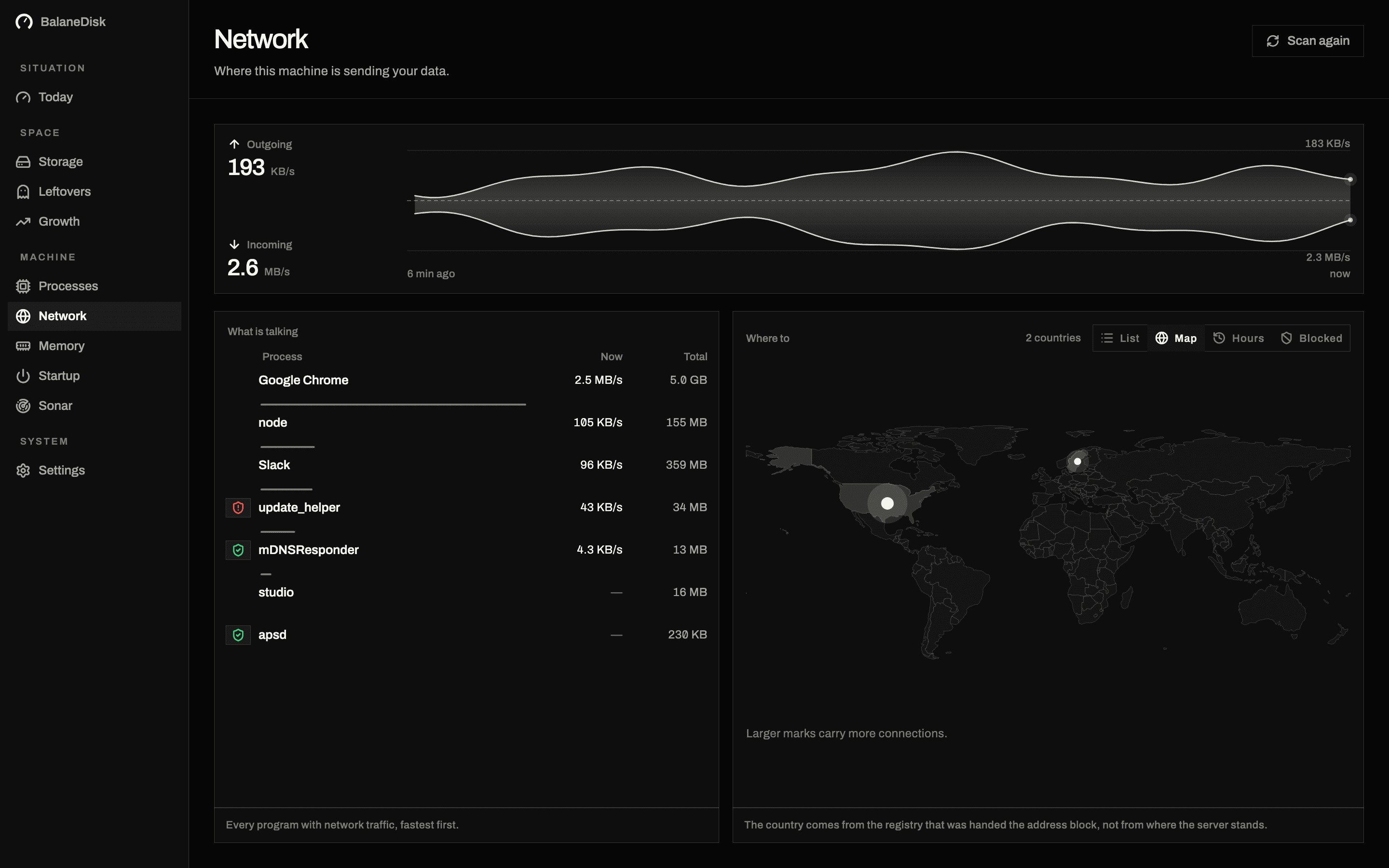
BalaneDisk sits beside the traffic. It asks the operating system which connections exist and which process owns each one, using the interfaces that are already there:
macOS      lsof / nettop — your own processes, plus more with elevation
Windows    Get-NetTCPConnection — every connection on the machine, all users
Nothing is intercepted. Nothing can be blocked. Nothing sits in the path of anything.
What each one gives you
| Little Snitch | BalaneDisk | |
|---|---|---|
| Block a connection | yes — its purpose | no, by design |
| Ask before a new connection | yes | no |
| Network filter extension required | yes | no |
| Live map of destinations | yes | yes |
| Company behind an address | yes | yes |
| Country, drawn on a world map | — | yes |
| Resolution without a network request | see below | yes, bundled database |
| Per-process traffic volume | yes | macOS only; Windows has no counter without ETW |
| Windows | — | yes, from the Microsoft Store |
| Also storage, processes, memory, leftovers, startup | — | yes |
| Price | paid licence | free for everything it finds |
Two rows in that table deserve more than a tick.
The lookup question, which applies to every tool here
An IP address on its own is not information. 52.113.194.132 tells you nothing. Something has to turn it into "Microsoft, Ireland", and there are only two ways to do that: query a service, or carry the data.
Querying is easy and it is what most tools do — a WHOIS lookup, a reverse-DNS query, a geolocation API. Now consider what that request contains. It contains an address your computer just connected to, sent to a third party, and repeated for every destination you look at. Over a day, that is a list of everywhere your machine goes, assembled by somebody else.
A tool built to show you where your data goes has, at that moment, sent your data somewhere.
The usual route
- Address 104.18.x.x
- → to a server
- → name comes back
That server now knows every destination your machine talks to.
The route here
- Address 104.18.x.x
- → database on disk
- → name, locally
Nothing leaves. The price: the list is as fresh as the last update.
BalaneDisk carries the database instead. The tracker lists, the network ownership data and the country mapping are bundled inside the application, and resolution happens on your machine. No request leaves. The only thing ever sent is a licence key, when you activate one.
This is not a claim that other tools are careless — several are careful about exactly this. It is a question worth asking of any of them, and the answer should be easy to find.
Where BalaneDisk is honestly worse
It cannot stop anything. If a program is talking to somewhere you object to, BalaneDisk tells you and that is the end of what it does. Your options are the program's own settings, uninstalling it, or the firewall you already have — Windows Defender Firewall with Advanced Security takes per-program outbound rules, and on macOS a filtering tool like Little Snitch is the right instrument.
No per-process byte counters on Windows. Windows exposes no ordinary API that attributes traffic volume to a process; the performance counters that look like they might are measuring disk and pipe I/O. Resource Monitor gets those numbers by running an ETW trace session. BalaneDisk does not yet run one, so on Windows it reports no volumes at all rather than a plausible wrong number, and the screen drops the columns it cannot fill. On macOS the volumes are there.
Saying that out loud is the point. A tool that shows you a number it cannot actually measure is worse than one that shows you a gap.
What it gives you that a firewall does not
A world map instead of a log. The same connections drawn country by country, so a machine talking somewhere it has no business talking is one glance away rather than one grep away. Countries appear as text, never as flag characters — those do not exist on Windows.
One tool, both platforms. In the Microsoft Store for Windows, signed and notarised for macOS, same code base.
The other five questions. Network is one of six things worth knowing about a computer. The same app measures storage with a verdict per finding, explains every running process in plain language with its signature checked, shows memory pressure over hours, finds what removed applications left behind, and lists what starts with the machine.
Free. Everything it finds is free, permanently, with no account. The subscription only opens the record of the past — 30 days of history instead of 2 hours. No finding is behind a paywall.
Which one you want
Little Snitch, if you want to decide what leaves your machine, connection by connection, and you accept a network filter extension to get that.
BalaneDisk, if you want to know what leaves it — with the company and country resolved locally, on a Mac and a PC, alongside the other five things going on — and you would rather handle blocking with the firewall that is already installed.
A fair number of people run both. They are not competing for the same job.
Next: Where does my Mac send data? How to find out · Where does my PC send data? How to find out on Windows
Questions people ask
- Can BalaneDisk block network connections like Little Snitch?
- No, and that is a design decision rather than a missing feature. BalaneDisk observes: it lists every connection with the process behind it and resolves the destination to a company and a country. Blocking requires a network filter extension sitting in the path of your traffic, which is a much larger thing to install and a much larger thing to trust.
- Is there a Little Snitch for Windows?
- Little Snitch itself is macOS only. Windows has its own outbound firewall built in — Windows Defender Firewall with Advanced Security, where you can add per-program outbound rules — and third-party front ends exist for it. BalaneDisk runs on both platforms but shows rather than blocks.
- Do network monitors send my connection list to a server?
- Many do, without saying so. An IP address has to be resolved to a company and a country somehow, and the cheap way is a WHOIS, reverse-DNS or geolocation request — which hands your list of destinations to a third party, one address at a time. BalaneDisk ships the database inside the application so no request goes out.