Docker is eating your Mac's disk: what prune really deletes
Docker.raw is 60 GB, docker system prune -a frees 40 of them — and takes things with it that nobody can get back. The four accounts behind the number, and which command empties which.
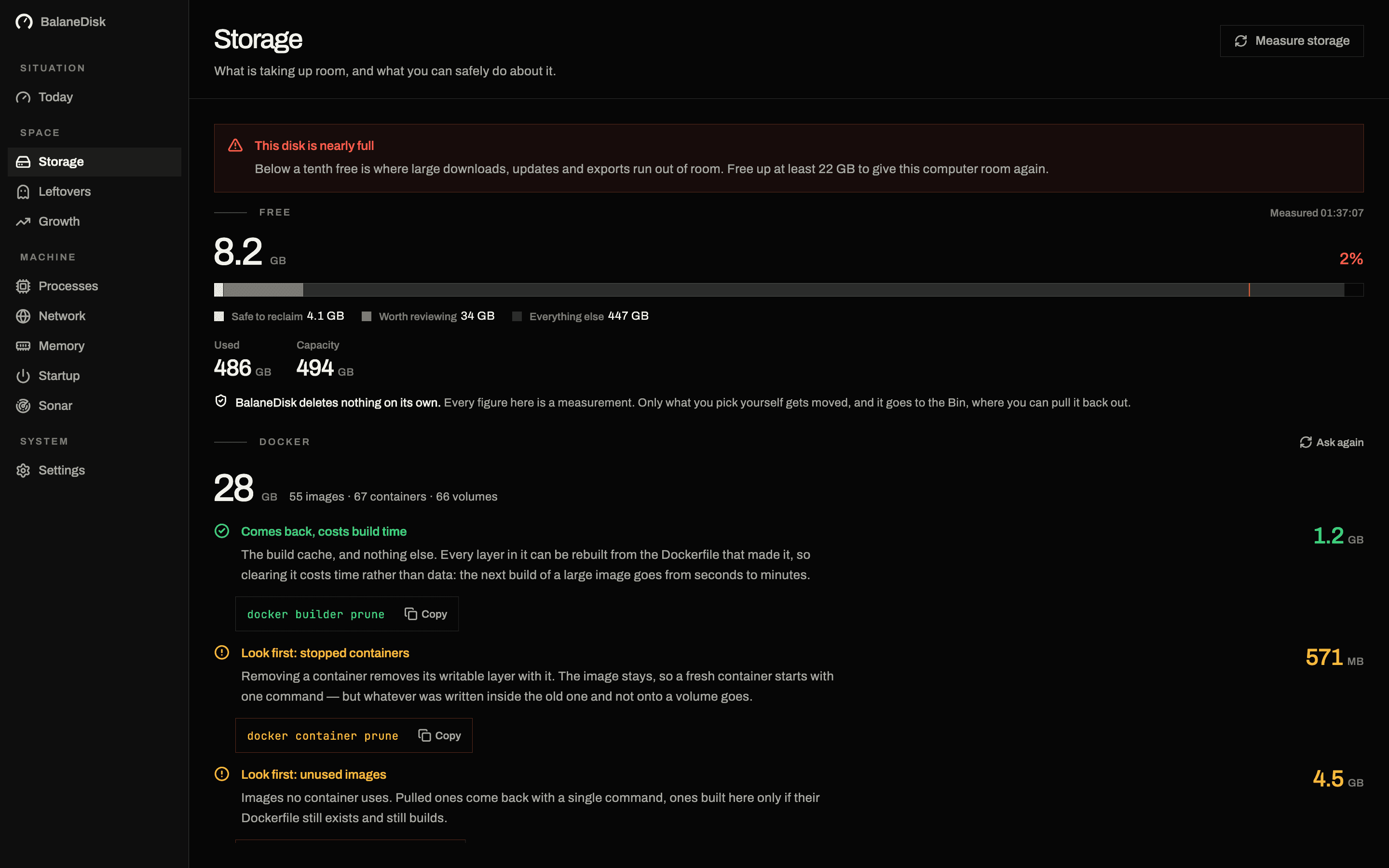
On a Mac running Docker Desktop, the single largest lump of disk is almost always the same file: ~/Library/Containers/com.docker.docker/Data/vms/0/data/Docker.raw. It grows to 40, 60, sometimes 100 GB, and a cleaning app sees exactly one number in it.
That number is the sum of four separate accounts, and adding them up is the mistake.
What Docker says about itself
The answer is not in the file system, it is in the tool:
docker system df -vThe call is read-only and returns four lines — Images, Containers, Local Volumes, Build Cache — each with SIZE and RECLAIMABLE. That split is what decides the cost of clearing up:
| Account | What is in it | What deleting costs |
|---|---|---|
| Build cache | intermediate layers of past builds | time on the next build |
| Images | pulled and locally built images | a re-download — or a lost build |
| Containers | writable layers of running/stopped containers | anything written in-container and not mounted |
| Local volumes | databases, uploads, state | real data, unrecoverable |
The commands, in the order they start to hurt
docker builder prune            # build cache only. Costs time, nothing else.
docker image prune              # only unused, untagged (dangling) images.
docker system prune             # + stopped containers, unused networks.
docker system prune -a          # + EVERY image without a running container.
docker volume prune             # anonymous volumes.
docker volume prune -a          # named ones too. Those are usually data.
The step from line three to line four is one flag. It is also the difference between "I wait two minutes on the next build" and "the image I built three months ago, whose Dockerfile no longer exists, is gone".
The step from line five to line six is a flag as well — and behind it live Postgres volumes.
Why we never suggest the blanket command
Docker does not distinguish between an image pulled from a registry and one built here. To the daemon they look the same. A tool watching from outside therefore cannot know that difference — and so must not claim it.
BalaneDisk shows the four accounts separately, with three verdicts:
- safe — build cache, dangling images
- look first — images, container layers
- contains data — named volumes
and hands you the matching command instead of a button. You run it, in the terminal, knowing what it takes with it.
The rest of the truth about Docker.raw
Three sizes belong to this one file, and all three are correct:
- 01Allocated size — the ceiling Docker Desktop was given in its settings.
- 02Actually occupied — the blocks macOS has really handed out (sparse file).
- 03Used inside — what the Linux VM is using of it.
After a prune, (3) drops immediately and (2) only once Docker returns the free space to macOS. Anyone watching Finder alone reads that as a failed clean-up. It is just an image file that has not shrunk yet.
Getting the space back to macOS
Freeing space inside the VM and freeing space on your disk are two events, and they do not happen at the same moment. This is the part that makes people repeat a prune three times.
Docker.raw is a sparse file: it occupies what has been written into it, and it does not shrink on its own when data inside is deleted. The space has to be returned explicitly, by trimming the unused blocks.
Recent Docker Desktop versions run that TRIM automatically, typically shortly after a prune or on the next restart. If the file is still large an hour later:
- 01Quit and reopen Docker Desktop. The cheapest option, and often enough.
- 02Docker Desktop → Settings → Resources → Advanced, where the virtual disk limit lives. Lowering the ceiling does not shrink the file; it caps future growth.
- 03"Clean / Purge data" in Troubleshoot. This is the nuclear option: it discards everything, named volumes included. Read the account table above again before pressing it.
Until one of those happens, Finder is reporting a file that has not caught up yet — not a prune that failed.
On Windows the file is different and the problem is identical
Docker Desktop on Windows runs on WSL 2, so the equivalent lives in a virtual disk:
%LOCALAPPDATA%\Docker\wsl\disk\docker_data.vhdxSame behaviour: it grows as data is written, and it keeps its size after the data is gone. Same four accounts inside, same commands, same order of danger.
Reclaiming it takes two steps. Shut everything down first:
wsl --shutdownThen compact — with Hyper-V available:
Optimize-VHD -Path "$env:LOCALAPPDATA\Docker\wsl\disk\docker_data.vhdx" -Mode Fullor, without it, through diskpart:
diskpart
select vdisk file="C:\Users\<you>\AppData\Local\Docker\wsl\disk\docker_data.vhdx"
compact vdisk
exit
More on where that sits among everything else on a Windows machine: Windows storage full: where the space actually goes.
Keeping it from coming back
Pruning is a cure. These are the three things that stop it being an every-month ritual:
Prune the build cache on a time filter, not on impulse.
docker builder prune --filter until=168hThat drops cache entries older than a week and keeps the recent ones that are actually saving you time.
Cap the build cache. Docker Desktop → Settings → Builders lets you set a maximum size for the build cache, after which it evicts the oldest entries itself. A ceiling you set once beats a command you have to remember.
Write a .dockerignore. A build context that ships node_modules, .git and a dist folder into the daemon on every build wastes cache space and build time in the same motion. This is the fix with the best ratio of effort to effect, and it is one file.
Short version
- Never start with
-a.docker builder prunefirst — it costs nothing but time. - Review named volumes one at a time, never as a herd.
Docker.rawshrinks late. That is not a bug.- And the folder in Finder is the wrong lever: for a cache its own tool manages, the command is the right one.
Next: Mac storage full: where the gigabytes actually hide · What your Mac is really doing · A DaisyDisk alternative that tells you what the folder is
Questions people ask
- What is Docker.raw and why is it so large?
- Docker.raw is the virtual disk of the Linux VM that Docker Desktop runs on a Mac. It is a sparse file: it only occupies what has actually been written, it grows as you use it, and it does not shrink automatically when you delete something inside the VM.
- Why doesn't Docker.raw get smaller after a prune?
- Because the space is freed inside the VM while the image file keeps its size outside. Docker Desktop returns it to macOS on the next restart or via "Clean / Purge data"; recent versions run a TRIM automatically.
- Is docker system prune -a dangerous?
- It deletes no named volumes, but it does delete every image without a running container — including ones you built here and never pushed to a registry. Those are gone. It only becomes dangerous to data at docker volume prune -a.