Where does my Mac send data? How to find out
A computer nobody is sitting at opens dozens of connections in ten minutes. How to find out which program is talking where — with the built-in tools, and with one that resolves the destination offline.
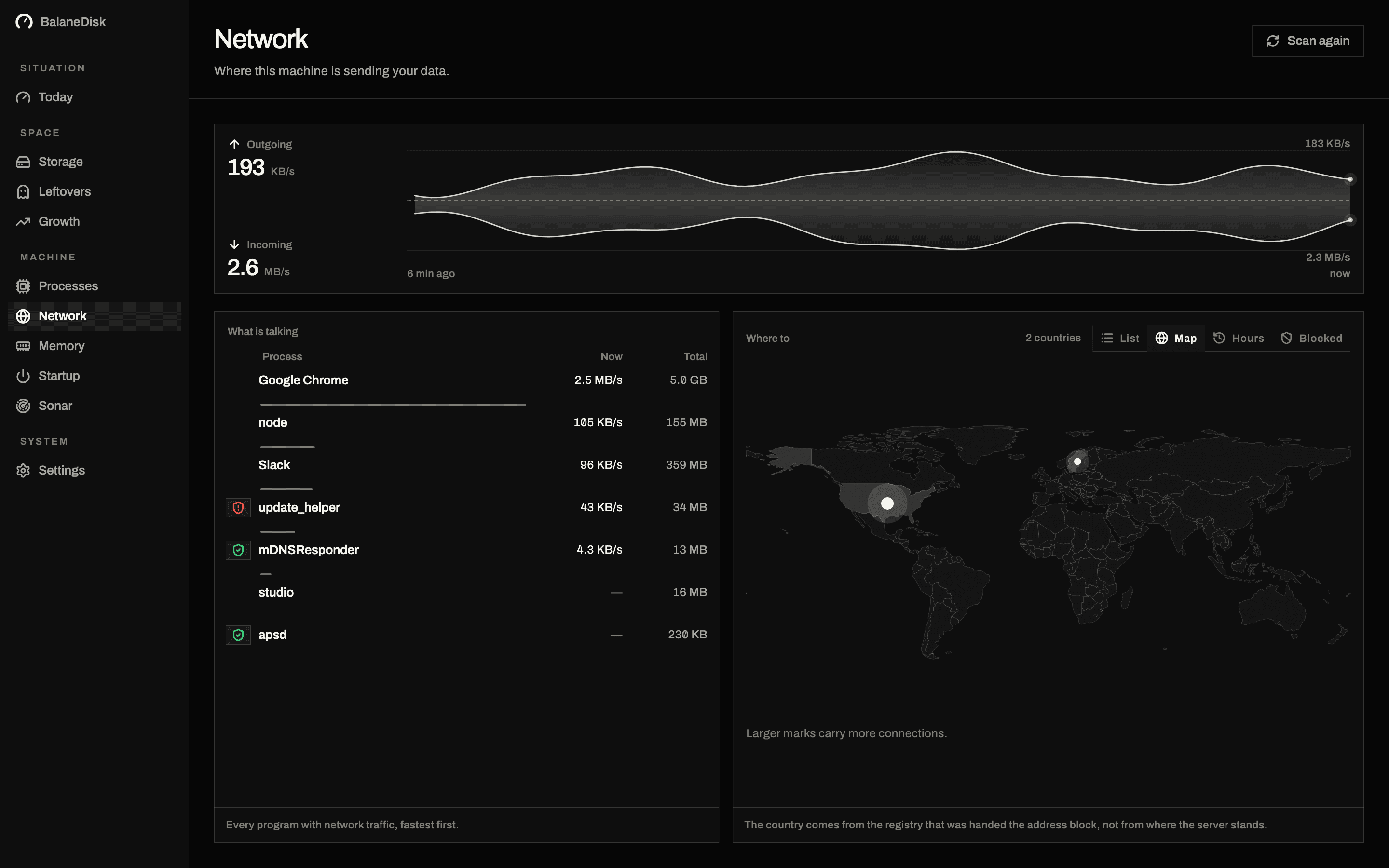
Put the machine on the desk, close every window, touch nothing. Ten minutes later — depending on what is installed — it has opened several dozen outgoing connections. Not a fault, not an attack. The normal state.
The question is only: which program is talking where?
What the built-in tools can do
macOS ships two useful tools, and both answer half the question.
lsof -i -P -n | grep ESTABLISHED
nettop -P -l 1
lsof names the process, the PID and the remote end. nettop shows what is flowing right now, per process. What neither says is who owns 104.18.32.7, which country that server sits in, or whether the destination is an analytics service.
That is where the built-in view stops. Activity Monitor gives you byte totals, not destinations.
The four groups nearly every connection falls into
- Operating system services. Time sync, certificate revocation (OCSP), push, software update.
- Updaters of installed applications. Every browser, every creative suite, every developer tool brings one.
- Telemetry. Crash reports, usage statistics, feature flags.
- The rest. Everything that fits none of the three — and that is where it gets interesting.
The first three groups are expected. The fourth is the reason anyone looks in the first place.
Reading the port numbers
Most of the list becomes legible once you stop treating the port as noise.
| Port | What it usually is |
|---|---|
| 443 | HTTPS — the overwhelming majority of everything |
| 80 | plain HTTP — mostly certificate revocation checks (OCSP/CRL), which are unencrypted by design |
| 853 | DNS over TLS |
| 5223 | Apple Push Notification Service — the long-lived connection your Mac keeps to Apple |
| 5353 | mDNS / Bonjour — local network only, printers and AirPlay |
| 123 | NTP, clock sync |
| 993 / 587 | IMAP and SMTP submission — your mail client |
Port 5223 to an Apple address deserves a specific mention, because it is permanent and it alarms people: it is the single push connection that everything from Messages to app notifications rides on. Its being open all day is the design working.
What macOS can and cannot block
This is where the built-in tools stop, and it is worth being precise about it.
System Settings → Network → Firewall filters incoming connections only. It has no opinion about what leaves your machine. Turning it on is a good idea and does nothing for the question in this article.
Outgoing filtering needs a network filter extension — a component that sits in the path of every application's traffic. That is what tools like Little Snitch install, and it is why they require explicit approval and survive reboots. It is a legitimate thing to install, and a large one; see a Little Snitch alternative that watches without blocking for what the trade-off actually is.
Per-application settings and uninstalling are the two levers that need nothing installed. A program you no longer use that still phones home should be removed, not filtered.
Why the lookup has to happen offline
The obvious route would be: send the address to a server, ask "who owns this?". That is precisely the route a tool built for privacy cannot take.
The usual route
- Address 104.18.x.x
- → to a server
- → name comes back
That server now knows every destination your machine talks to.
The route here
- Address 104.18.x.x
- → database on disk
- → name, locally
Nothing leaves. The price: the list is as fresh as the last update.
Asking gives the question away. A service that looks things up for you receives the complete list of your destinations in the process — the exact profile it exists to protect. So in BalaneDisk the GeoIP and tracker data ship as files inside the application and are read from disk. The price is freshness: the lists are as current as the last update. We pay it deliberately.
"Tracker" is a judgement, not a fact
A domain is not objectively a tracker. graph.facebook.com is one when a torch app talks to it in the background — and simply the service when somebody is signing in to Instagram.
So context is what counts: which process is talking, how often, and whether that process has a visible reason to. Infrastructure — CDNs, cloud regions — gets a category of its own instead of being sold as a finding. Seeing a destination at a large host says almost nothing.
A quarter of an hour worth spending
- 01Close every window, do nothing for ten minutes.
- 02Look at connections per process, not as one total.
- 03Walk the four groups and take only the fourth seriously.
- 04Write down anything odd: which program, which country, how regularly.
- 05Only then decide: uninstall, change a setting, or simply know.
Blocking is explicitly not the first step — and BalaneDisk blocks nothing (yet). The value is in knowing: catching a program you believed was local being anything but. That happens more often than people expect.
Next: Memory pressure is not free memory · What your Mac is really doing · Windows machine? Where does my PC send data?
Questions people ask
- How do I see where my Mac connects to, using built-in tools?
- `lsof -i -P -n` lists open sockets with process names, and `nettop -P` shows live traffic per process. Both give you IP addresses; which company sits behind them is left for you to look up.
- Is it normal for an idle Mac to keep sending?
- Yes. Time sync, certificate revocation, push delivery, software update and the updaters of installed applications all talk regularly while you do nothing. What is worth noticing is not that traffic exists, but who is producing it and where it goes.
- Does a tool like this need internet access?
- Not to measure. Only to look up company and country — and that lookup is exactly what would ship the list of your destinations to a server. So the database belongs inside the application, not in the cloud.