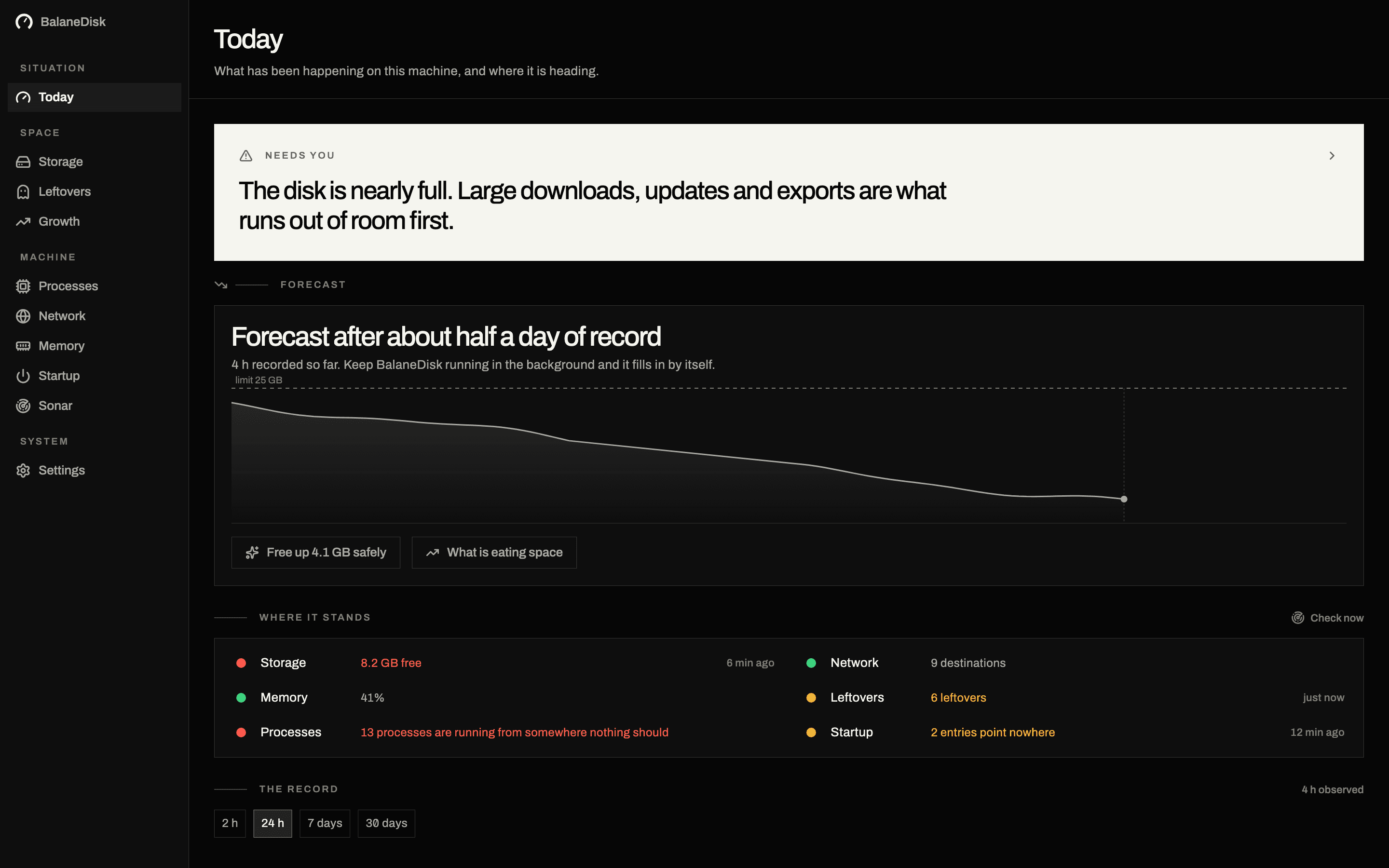
01 · Situation
Today
What has been happening on this machine, and where it is heading.
Know whether anything is wrong before you have read a single figure.
macOS · Windows · Version 0.2.1
It tells you when the disk will be full — days before it is — and names the folder eating it. Every process explained, every connection resolved to the company receiving it, and nothing moved that you have not ticked.
Free, no account, nothing leaves the machine
The forecast
Every disk tool shows how full the disk is today. BalaneDisk keeps measuring, keeps the record, and answers the question that actually decides your week: at this rate, when does this computer stop working?
01 / 04
Free space is read every sixty seconds, straight from the system — the figure macOS and Windows themselves use to decide whether an update still fits. One number, the same on every screen.
02 / 04
When free space jumps by more than a gigabyte, somebody cleared something. The record is cut there and the arithmetic starts again — instead of a straight line averaging your cleanup into a false all-clear.
03 / 04
The median of the slopes between every pair of hours at least three apart, over up to two weeks. One big download nudges it instead of setting it off, and the range beside the figure says how sure it is.
04 / 04
A computer struggles long before the last byte: updates fail, exports abort. So the count runs to a tenth of the disk — never less than 15 GB, never more than 25.
≈9days
If nothing changes
until this disk runs short
range 7–12 days · losing 2.1 GB a day · measured over 8 days
An illustration. The chart on the Today screen is drawn from your own record — and until there is half a day of it, the screen says so instead of guessing.
When something writes gigabytes an hour, the count switches to hours and names what is writing.
Notifications
A forecast nobody sees is a chart. BalaneDisk stays in the menu bar or the tray, keeps measuring while you work, and tells you when the disk turns — not when the next download fails.
Disk warnings are never rationed. Free or paid, the warning that the disk is filling arrives when it is true — on the free copy, every other kind is gathered into one a week.
Quiet only while you are looking at the window. Minimised, behind another app or closed: the notification comes.
Starts with the computer if you let it. The switch is in the first tour, and nothing is on until you press it.
If the system has notifications blocked, the Today screen says so — instead of the app going silent without telling you.

BalaneDisknow
The disk is filling up
At this rate there is no room left in about 3 days.
BalaneDisk08:02
Space has gone
11.6 GB went while nobody was looking.
BalaneDiskTue
A folder is growing
Docker is 6.4 GB bigger than it was.
BalaneDiskMon
Something new is running
update_helper started from a place nothing usually starts from.
Growth
Every disk tool on both platforms answers what is large today. None of them answers the question people actually ask: it was fine yesterday — what took twelve gigabytes overnight. Growth keeps the difference between measurements instead of photographing the disk, so it can name the folder that grew while nobody was watching.
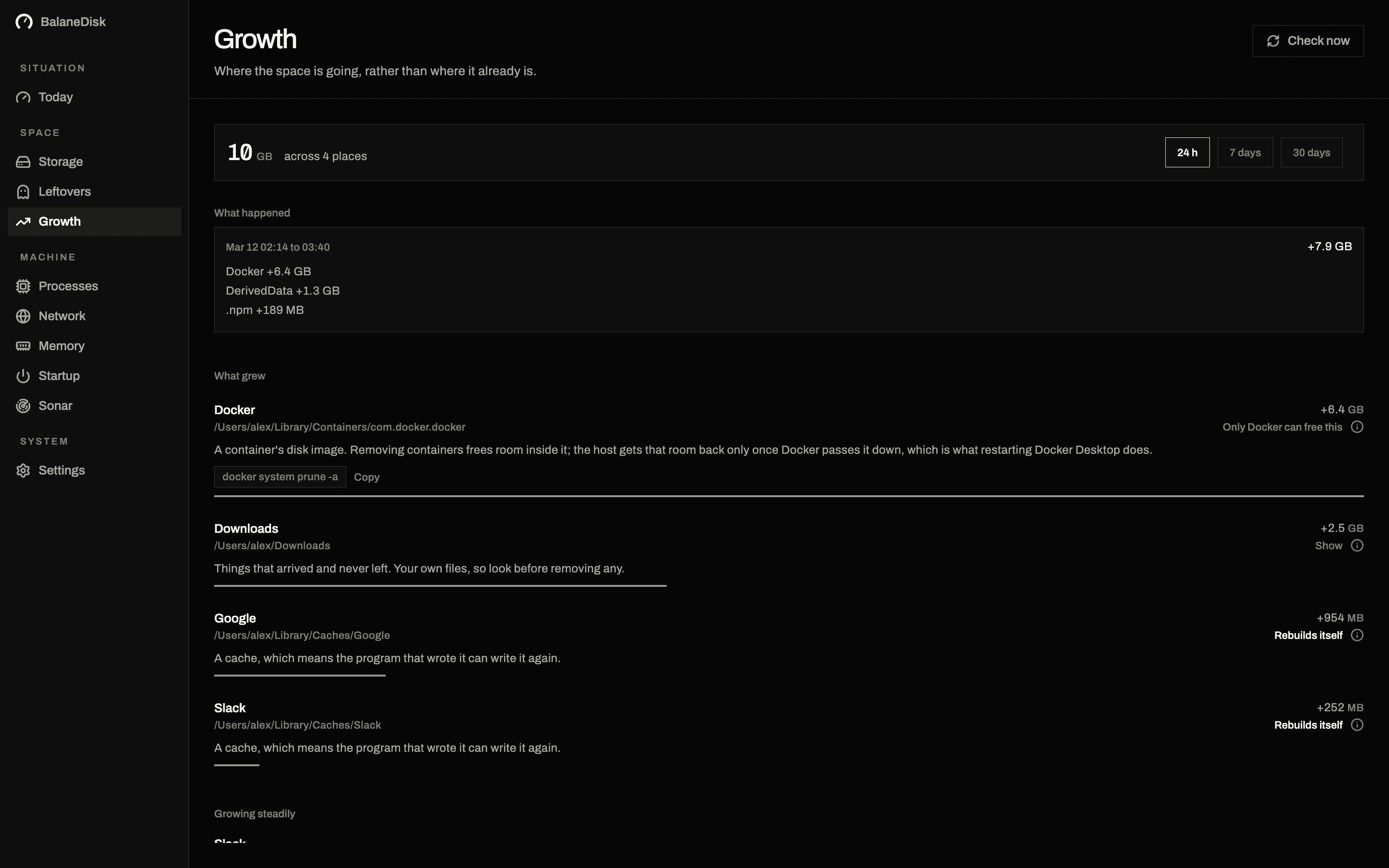
What happened
Only Docker can free this
Rebuilds itself
Rebuilds itself
It names the hour, not just the folder. A window of ninety minutes with three folders in it is a thing you can remember doing.
Each place carries what it costs to get back: rebuilt for free, handed back only by the tool that made it, or your own files, which are nobody's to clear.
The first pass only writes down what is there. From the second on, this screen is about change — which is why it says so rather than showing an empty chart.
Three promises
Nothing is uploaded. Nothing moves until you press. And no figure is invented — where nothing was measured, the screen says exactly that.
01
No file contents, no folder names, no telemetry. The country and tracker databases ship inside the app, because a tool that asked a server which trackers you talk to would be handing over the very list it exists to protect.
02
BalaneDisk measures and explains. What it clears is what you ticked, it goes to the Bin, and emptying the Bin is a second button with its own warning on it.
03
Every figure on screen is a measurement. Where there is no measurement, the screen says so instead of printing a plausible zero.
Every screen
01 · Situation
What has been happening on this machine, and where it is heading.
Know whether anything is wrong before you have read a single figure.
02 · Space
Where the space is going, rather than where it already is.
Find out what took twelve gigabytes overnight, by name and by hour.
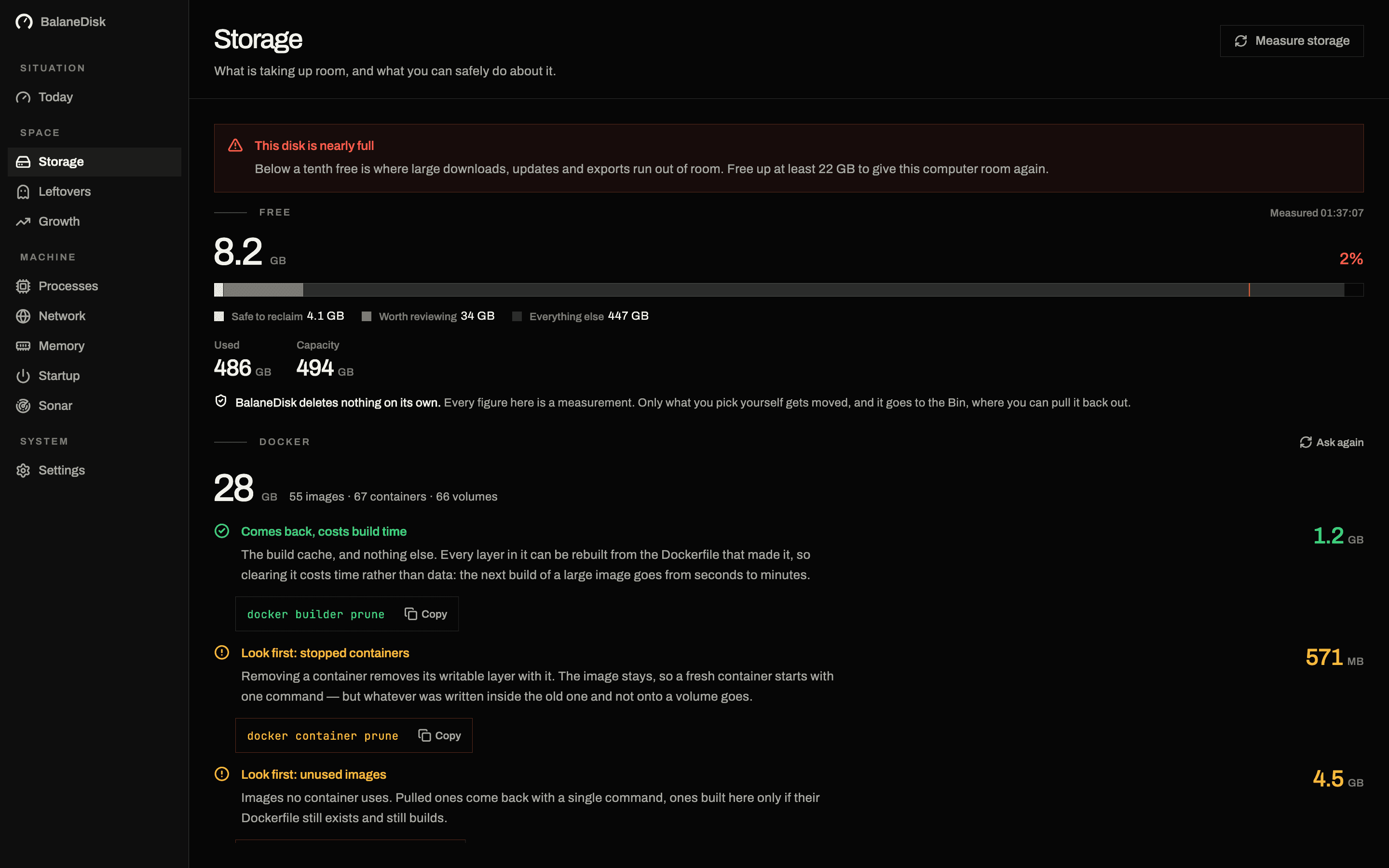
03 · Space
What is taking up room, and what you can safely do about it.
Get the exact command that gives 40 GB back — or the folder, open in Finder.
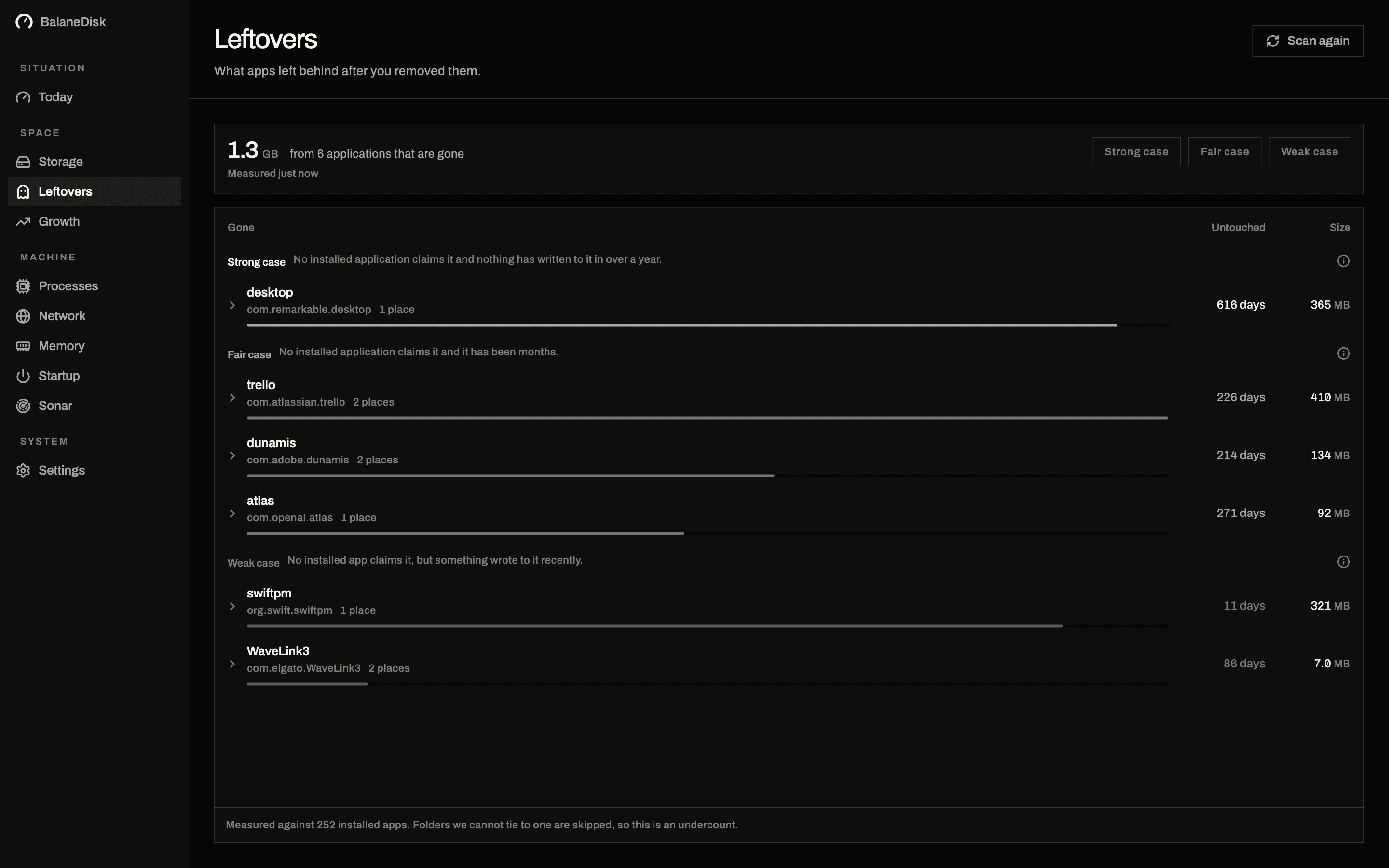
04 · Space
What applications left behind after you removed them.
Clear out what applications left behind years ago, in one pass, to the Bin.

05 · Machine
Everything running right now, and what each one actually is.
Understand the thing eating your battery without opening a search engine.

06 · Machine
Where this machine is sending your data, and who receives it.
Find the application talking to a company you have never heard of.
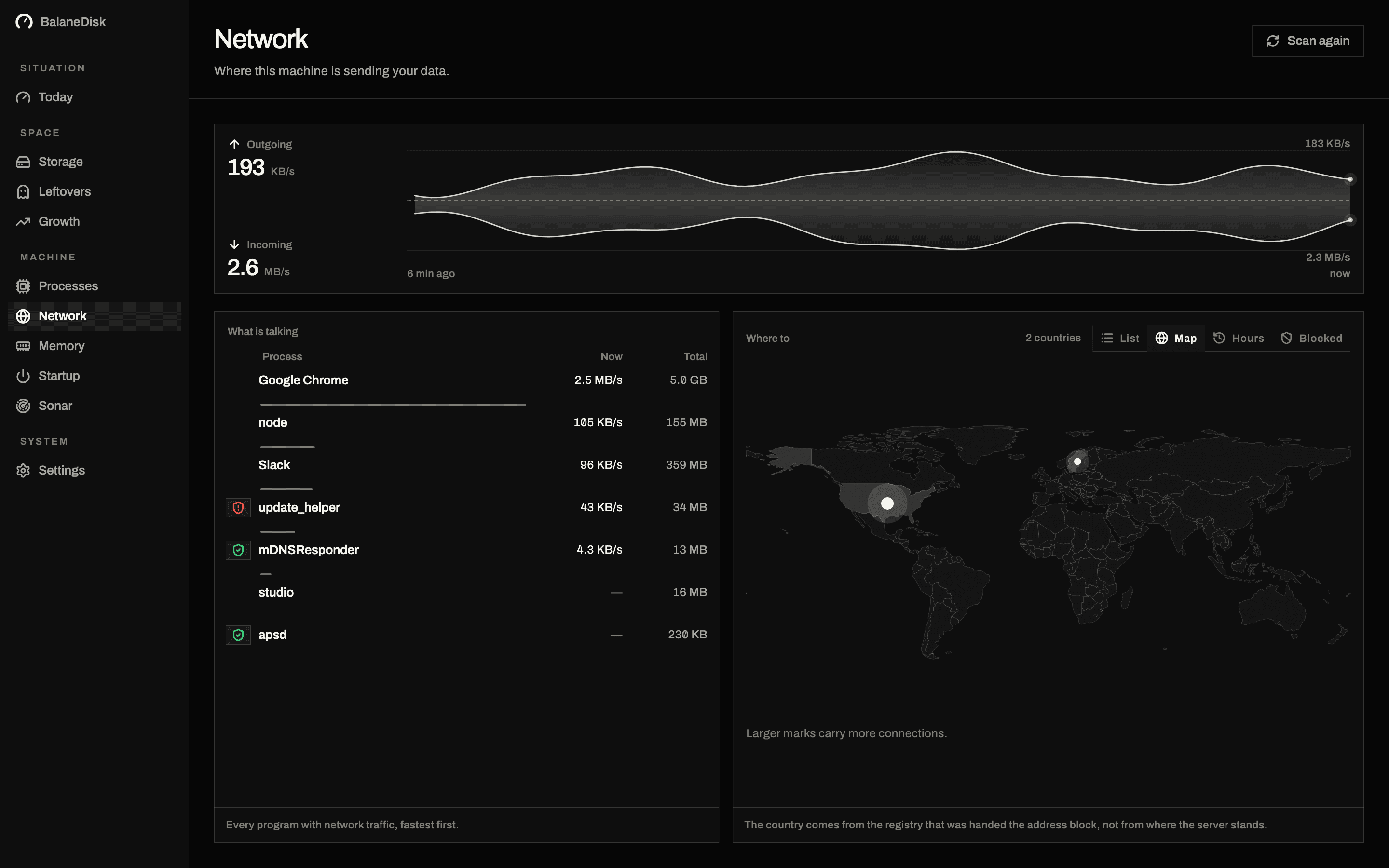
07 · Machine
The same connections, drawn on the world.
Notice a country appearing that nothing installed here can explain.

08 · Machine
What memory pressure is, and who is causing it.
Tell a machine that is busy from a machine that is in trouble.

09 · Machine
What starts with this computer, and what points nowhere.
See what signed itself up to start with your machine, and when.
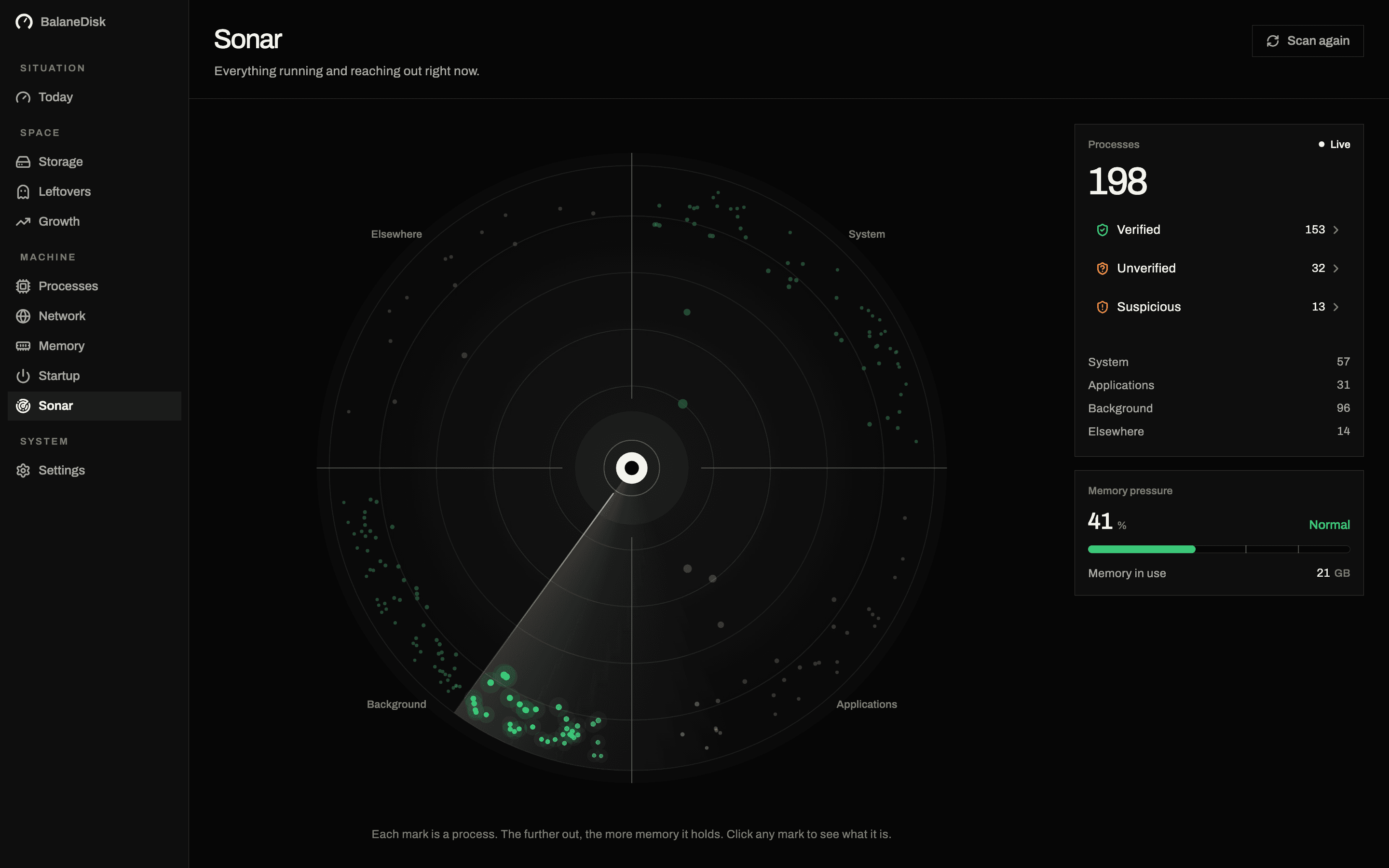
10 · Machine
Everything running, reaching out, and settling on this machine.
Spot the one process holding a third of your memory without reading a table.
Look at your own machine first.
Everything BalaneDisk finds, it finds for free — on both platforms, with no account.
What it finds
Typical findings on a working computer after a year or two. The sizes are the ranges we keep seeing on test machines, not a promise — BalaneDisk measures yours and tells you the real number, along with what it costs to get each one back.
| Finding | Typical size | Verdict |
|---|---|---|
Xcode build data and device support Rebuilt on the next build. The single largest finding on most Macs that compile anything. | 10–60 GB | Safe |
Docker images, volumes and build cache Asked of Docker itself, split into four accounts — because a named volume is a database and an unused image is a download. | 5–80 GB | Look first |
Package manager caches (npm, pub, Homebrew, pip) Purely re-downloadable, and the places that fill up again fastest — which is what puts them on the cleanup list. | 2–15 GB | Safe |
iOS simulators and old device backups Every simulator carries its own data. Backups may be the only copy of a phone that no longer exists. | 5–40 GB | Look first |
Leftovers of applications you removed Grouped by the dead application, with a confidence score. Moved to the Bin only when you press the button. | 0.5–8 GB | Look first |
Processes running from a temporary folder Usually an installer or a build tool. Occasionally the thing you would want to know about within the hour. | 0–13 | Worth reading |
Blocked destinations
Every outgoing connection is resolved to a company and a country. If one of them should not be receiving anything, one press puts the address into the computer's own firewall — and the same press takes it out again.
| Destination | Country | From | |
|---|---|---|---|
| Amazon Web Services | USA | 3 apps | |
| Advertising tracker | Ireland | update_helper | BlockBlocked · the firewall holds it |
| Cloudflare | Netherlands | Browser | |
| Microsoft | Ireland | System |
Blocked for the whole computer, not for one app — and that is written next to the button, not in a manual.
Your list stays readable without a password, and it says openly which entries the firewall really holds.
Applying asks for your password once, because only the system may change its own firewall. Free, like everything it finds.
Every process, judged
Three colours, and they are the only colours in the application. Everything else — every panel, every chart, every heading — is paper, ink and one grey between them, which is exactly what makes a single amber dot findable from across a desk. The verdict is never colour alone: each one carries a word and an icon as well.
Signed by the system or a publisher we recognise.
Signed, but we cannot vouch for the publisher yet.
Unsigned, or running from somewhere it should not be.
Suspicious is not the same as malicious — build tools and installers look exactly like this. It is the short list worth reading. Verdicts survive a restart: each one is filed against the size and date of the file it judged, and thrown away the moment either changes.
The habit
Every other screen reports a condition, and a condition cannot be finished. The round can: three checks, one morning a week, and an ending that says you are done. It is the only place in the application where somebody is told they have completed something.
01
The places that have come on since the last round, largest first.
02
Only what is already on your cleanup list, with today's size beside each entry.
03
Anything that has added itself to what this machine starts by itself.
The ending
That is this week's round — the fourth in a row.
Leaving early is free and leaves no mark: the round is only written down when the last card is reached. Pick the day, or turn it off entirely; it never speaks in between.
The rule that shapes the product
A cleaner that empties folders unasked is asking for trust with data it does not understand. So BalaneDisk measures, explains what a finding is, and then hands over the lever — and where it does clear up, it does it in two steps that you take, in the open.
A folder only joins the cleanup list because you put it there. Suggestions come from what has actually filled up again on this machine, and ticking one adds a name to a list — nothing else.
Every clearing shows you each entry and its size first, and moves them to the Bin. The Bin sits on the same disk, so nothing is freed yet — which the screen says, rather than claiming a number it has not earned.
Emptying the Bin is a separate button with a warning on it, because that is the step that cannot be undone. It is also the step that gives the space back.
Never the blanket command. docker system prune -a also removes the images of stopped containers; one flag separates tidying up from losing data, and the app names the difference instead of hiding it.
Nothing outside your home folder can go on the list, and places that look like real data are refused outright — with a sentence saying why.
What leaves this machine
A tool that reports what your computer talks to has no business being chatty itself.
Your key and this computer's name, so one licence stays on one computer. Nothing else is attached.
Whether a newer version exists. The answer is a signed file; nothing about you goes with the question.
No file contents, no folder names, no process list, no addresses. The GeoIP and tracker databases are bundled and read from disk, so lookups happen on your machine or not at all.
No account, no sign-in, no analytics, no crash pings. An unpaid copy makes no requests at all.
How it differs
The category is crowded, but almost nothing overlaps. This is what each kind of tool is actually built to do.
| BalaneDisk | Cleaner apps | Network monitors | Built-in tools | |
|---|---|---|---|---|
| Forecasts when the disk will be full | Yes | No | No | No |
| Warns before it is full — free, never rationed | Yes | Partly | No | Partly |
| Names what took the space since yesterday | Yes | No | No | No |
| Explains each process in plain language | Yes | No | No | No |
| Resolves connections to company and country | Yes | No | Yes | No |
| Finds what removed applications left behind | Yes | Yes | No | No |
| Blocks a destination in the system firewall | Yes | No | Yes | Partly |
| Clears only the folders you ticked, to the Bin | Yes | No | — | Partly |
| macOS and Windows | Yes | Partly | Partly | Yes |
| Works without sending anything anywhere | Yes | No | Partly | Yes |
Categories, not individual products, and written from what each kind of tool sets out to do. Judge ours against yours — the free version finds everything the paid one finds.
Price
Nothing BalaneDisk knows is behind a gate. A free copy runs every scan, reads every verdict, keeps a week of record and clears up once a week. What money buys is frequency, scale and being told the morning something happens instead of at the end of the week.
The line used to run through knowledge — everything found, shown to everyone, and a month of record instead of two hours. Two hours is not enough record for a chart to be a chart, so the free copy had nothing to come back to. Now the line runs through how often and how much.
0 €for as long as you use it
24,99 €a year
Saves 58 % against monthly. 7 free days first — cancel during them and nothing is charged.
Start 7 free days4,99 €a month
No trial on this plan, and no year to commit to. Cancel from your own account whenever you like.
Subscribe monthlyBoth plans unlock exactly the same thing. Activating sends your key and this computer's name, and nothing else.
Nothing starts recording when you pay. This computer has already measured that past — the subscription opens the part of it you cannot see yet.
Get it
Signed and notarised for macOS, built for Windows from the same code. It starts measuring the moment it opens — no setup screen, no empty dashboard with a button on it.
Version 0.2.1
Questions
Not on its own, and never behind your back. A folder reaches the cleanup list because you put it there; every clearing shows you each entry and its size before it moves anything; and what it moves goes to the Bin. Emptying the Bin is a separate button with its own warning, and that is the only step that destroys anything. Everything else — caches, build data, the leftovers of applications you removed — is measured, explained, and handed to you as a command or a folder.
Good enough to act on, and honest about the rest. It needs about half a day of record before it says anything; it ignores the jump a cleanup causes instead of averaging it in; it uses the median of many slopes rather than one fitted line, so a single large download cannot set it off; and it always prints a range next to the figure. It counts to the point where the computer starts to struggle — a tenth of the disk, between 15 and 25 GB — not to zero.
The forecast on the Today screen, which says when the disk will run short and what is growing fastest; notifications that arrive with the window shut and are never rationed when the disk is filling; free space read from the system every minute, as one figure on every screen; and blocking a destination in the system firewall with one press. Growth, the weekly round and the cleanup list you build yourself are all still there.
On macOS, Full Disk Access, so it can measure the folders that actually fill up; the app explains why before the system asks. On Windows, elevation for the deeper counters. Everything it reads is measured and shown on your screen, and nothing is sent anywhere.
Yes — the same code base, built on Windows for Windows, and the two are kept in step screen for screen. It is in the Microsoft Store, which installs and updates it for you; a direct ZIP is published alongside each release for machines without the Store. The macOS build is signed and notarised.
No. The free version asks for nothing. A subscription gives you a key you paste into the app, which activates it for one computer — and you can release that computer yourself at any time.
It is worth it. The record of the last days only exists if the app was there to take it, so closing the window puts BalaneDisk back in the menu bar or tray instead of quitting. A quiet machine shows just the mark, with no text beside it.
Eight: English, German, French, Spanish, Italian, Portuguese, Dutch and Japanese — including the plain-language explanation of each process, which is the part no comparable tool localises.